Pages

Monday, June 20, 2016

HTTP


                   Before rushing to what is HTTP and what is HTTPS, lets proceed with the basic details and the derivation of HTTPS in the field of  Data Communication in Information Technology.


                     Communication is an essential factor for human existence. Since the past, different types of communications among humans has brought them a so far of a distance as present. Below figure shows different kinds of communications among humans.
In Human Communication, they convey their ideas to each other. And with the ideas taken from others, humans process them inside their heads in order to reach a final decision. 
   
                                Heads in humans are equivalent to the Computers in Information Technology.  Furthermore, Computers can be known as the foundation element in IT. Thus.... 
                
             Have you ever thought of communication in IT ...?


So the communication in IT takes place through the main unit of Computers. Message receive, message processing, message output delivering is done by Computers. Here the word 'message ' refers to a collection of data. Below figure shows the five main components involved in the communication process in 

                     
  • Message is a collection of data in a chosen format
  • Sender and Receiver are two computers communicating 
  • Medium can be a cable medium or a wireless medium
  • Protocol is a set of rules and instructions to be used in the communication procedure by its endpoints
HTTP is another Protocol

What exactly is HTTP?

                            As mentioned earlier, HTTP....,  abbreviation for Hyper Text Transfer Protocol is a Protocol..., that is a set of instructions describing a data communication procedure. It allows to transfer various data formats between the sender and receiver such as 
                                                                                 - Plaintext
- Hypertext
- Images
- Video
- Sound


In brief it is the foundation of data communication in the World Wide Web.


The environment in which this data communication occurs and all the data communication components(sender, receiver, message document) resides is known as World Wide Web(Web). In the Web the documents and resources like computers are identified by URLs(something like an address given for each item in the Web)


Features of HTTP...

1)  It is a request-response protocol in the client-server computing        modal


 A web browser, for example, may be the client and an application running on a computer hosting a web site may be the server.
The client submits an HTTP request message to the server.
The server,  returns a response message to the client. 
The response contains the requested message body, status information about the response


2)  It is an Application Layer Protocol

                     For the purpose of vivid explanation and understanding of the  data communication, common frame of reference was introduced. OSI (Open Systems Interconnect Reference Mode) was the first reference model to discuss the data communication. It contains 7 layers and each layer describes the function performed when data is transferred between two applications. From below link can get more of a understanding on the functionalities of each layer.

     After the OSI model, TCP/IP model was introduced with an abstraction of layers. It consists of only 4 layers and the data communication is described in terms of 4 layers. Out of these 4 layers, HTTP is an Application Layer Protocol.Below figure shows the layered architecture description for data communication.


The protocols in the Application layer is responsible for process-to-process  communication/ application-to-application communication.  This layer is responsible only for standardizing the communication. To perform host-to-host communication, this Application layer protocols  depend on the Transport Layer protocols like TCP.


3)  It is media independent

As mentioned earlier any type of data can be sent over HTTP protocol such as plain text, hypertext, images, videos etc.


4)  It is a stateless protocol

This means that the HTTP protocol treats each request  as an independent transaction and is not related to any of the previous requests.  This makes the communication to consist of unique request-response pairs. 

This stateless design makes the server design simple, since there is no need of dynamically allocating


HTTP  URLs (Uniform Resource Locater)

      • A URL is used to uniquely identify a resource over the web.
Syntax :
    protocol://hostname:port/path-and-file-name\


http://xxx.myplace.com:80/cgi-bin/t.html


protocol (http, ftp, smtp,dns,news..etc)
host name (name.domain name)
port (usually 80 but many on 8080)
directory path to the resource
resource name


 How HTTP works......

  •  Client wants to visit        http://www.yahoo.com


  • Request is sent to the DNS Server. It converts the domain name and send the Server IP


  • The IP address is sent to the web server make the connection


  •  Requested web page is sent by the server after establishing the connection


 HTTP Request Message 


 HTTP Response Message


 HTTP Redirection


when a web page is visited at a certain URL, it changes to a different URL


eg :


a person visits "website.com/page-a" in their browser 
                     But it is redirected to                          
                      "website.com/page-b" instead

  • A redirected URL would open up a page with another URL
  • The server specifies the redirection by returning 3xx status code (set aside for redirects)

Few Applications of Http Redirect


  • if the company is migrating to a new web site, all requests can be redirected from the old to the new website
  • when the domain name is misspelled by users, organisations register likely misspelled domains and redirect them to the correct location 
  • redirection is used by URL shortening services  


 Cookies

  • method of maintaining states between HTTP requests
  • small piece of data sent from website and stored in the user’s web browser at the first time user visits that web site
  • Every other time the user visits the same web site, the browser sends the cookie back to the server to notify the website about user’s previous activity
eg: Amazon
                       The more you use the site, the more Amazon understands what kind of products you
                    search for and buy.    
                    make recommendations of products you might like
                    help prevent extensive searching in such a big store


Web Caching

  • Is a technology that significantly enhance the web browsing experience
  • Web cache is the temporary storage place for web documents (HTML pages,images etc) requested from the internet
  • After the original request, further requests for the same file are returned from the cache in the LAN
  • Advantages
                - users experience a fast download
                - bandwidth usage is extensively reduced and free for another delivery
                - content available during network interruptions


Sunday, June 19, 2016

Maven Plugins for a Multi-Modular Project

appassembler-maven-plugin


       End to end portability of applications is a vital fact when it comes to the industry level mainly. In Java it has always been a pain due to the missing OS abstractions.
    
    The main goal of the Appassembler Maven plug-in is to overcome this pain and to produce deployable daemons in various configured OSs.


      The Application Assembler Plugin is a Maven plugin for generating scripts for different OSs  for starting java applications.

   
                                                                             All artifacts
                                                        (dependencies + the artifact from the project)

                                                            classpath in the generated bin scripts.


  • Below shows the appassembler maven plugin

 <!-- http://mvnrepository.com/artifact/org.codehaus.mojo/appassembler-maven-plugin -->

<dependency>
    <groupId>org.codehaus.mojo</groupId>
    <artifactId>appassembler-maven-plugin</artifactId>
    <version>1.3</version>
</dependency>


maven-assembly-plugin


Assembly =>  group of files, directories and dependencies that are assembled into ONE archieve.

              
        So Assembly Plugin for Maven is intended  to group the project output together with its dependencies, modules, site-documentations and other files into a one distributive archive. 

To use the Assembly Plugin in Maven, you simply need to:

  • choose or write the assembly descriptor to use(assembly.xml)
  • configure the Assembly Plugin in your project's pom.xml, and
  • run "mvn assembly:single" on your project.

assembly descripter

  • 2 types of descripters
1) Prefabricated Assembly descriptors
                                handle many common operation like packaging an artifact 
                                to a zip archive along with the site documentation 

              http://maven.apache.org/plugins/maven-assembly-plugin/descriptor-  refs.html 

 Above link gives a good description on such descriptors


2) Your own descriptor
                                Other than the common assembly requirements, using this
                                 type  of descriptors we can specify 
                                                           - the type of archive to  make
                                                           - the content in the assembly
                                                           - the way the dependencies and modules are
                                                              bundled in assembly

<!-- maven assembly plugin. --><plugin>
    <artifactId>maven-assembly-plugin</artifactId>

    <executions>
        <execution>
            <id>zip</id>
            <phase>package</phase>
            <goals>
                <!-- Assemble an application bundle or distribution. -->                <goal>single</goal>
            </goals>

            <configuration>
                <!-- assembly.xml file contains the configurations of assembly plugin. -->                <descriptor>assembly.xml</descriptor>
            </configuration>
        </execution>
    </executions>
</plugin>
 
 
examples can be found in the following link
 http://maven.apache.org/plugins-archives/maven-assembly-plugin-2.6/examples/multimodule/index.html 
 
 important
http://maven.apache.org/plugins-archives/maven-assembly-plugin-2.6/examples/multimodule/index.html


maven-jar-plugin

               This plugin provides the capability to build jars.  The jar is the default packaging type.So it is not required to set it in most cases.


  • jar:jar create a jar file for your project classes inclusive resources.
  • jar:test-jar create a jar file for your project test classes .

 How to build a jar file 

When you want to create a jar file with your Maven project, first create a pom file with at least the below configs.
"jar" is the default packaging type. So not required to set in the above  case. Using the below command we can create a artifact

                                 mvn package

Generated jar file is in the target directory
The resulting jar ===>  compiled classes + src/main/resources


So what could be the use of the maven jar plugin..? 

    - You can customize the manifest by default. SInce the jar plugin uses Maven  Archiever , it does not create the implementation details in the manifest by default. Say explicitly in the plugin configuration as required

https://maven.apache.org/plugins/maven-jar-plugin/examples/manifest-customization.html

    -Can include and exclude content from the jar archive

https://maven.apache.org/plugins/maven-jar-plugin/examples/include-exclude.html

    - Can create additional attached jar artifacts from the project 

https://maven.apache.org/plugins/maven-jar-plugin/examples/attached-jar.html

   - can create a jar containing test classes
https://maven.apache.org/plugins/maven-jar-plugin/examples/create-test-jar.html


maven-compiler-plugin

  • compiler plugin is used to compile the sources of your project.  

  • The default compiler is  javax.tools.JavaCompiler   which is used to compile the java sources


  • There are two main goals for the Maven plugin. Each of these goals are bound to their respective phases in the Maven Life Cycle. So they get automatically executed in those respective phases.
                          compiler:compile goal   =>    executed by the command    mvn compile
compiler:testCompile goal   => executed by the command     mvn test-compile
  • Below shows a simple configuaration of Maven Compiler Plugin

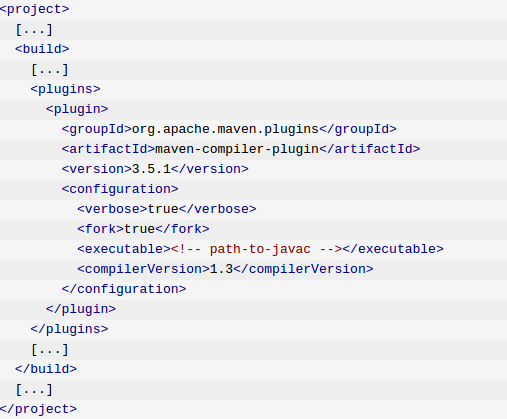
  • To compile sources with a different JDK, use the below configuration with fork set to true and compilerVersion with the version required


maven-antrun-plugin

Provides the ability to run ant tasks from within maven. Other than that anyrun plugin is also used to unpack the artifacts of the project


You can embed your ant scripts in the pom file. But it is encouraged to move all the Ant tasks to build.xml file call that file from pom.xml


Wednesday, June 8, 2016

SELENIUM

What is Selenium ?


                  It is a Portable Testing Framework  for web applications. In other words, it automates web browsers.

That means it is not limited for testing purposes. Selenium can also be used for automating boring web based Administration Tasks.


It's a Open-Source Software released under Apache 2.0 License , written in Java.

It provides a test domain-specific language to write tests in number of different other languages such as Java, C#, Perl, Python, PHP, Ruby.

Then these tests can be run on most modern web browsers in several different platforms  such as Windows, Linux and Macintosh


Sunday, June 5, 2016

FRISBY


Frisby.js is a framework used for testing the REST APIs. It is built on node.js. Furthermore it is a open-source, free tool with a good support for different platforms.


Install Frisby

  1) First download and install node.js

              curl --silent --location https://deb.nodesource.com/setup_5.x | sudo bash -

              sudo apt-get install nodejs


  2) Then install frisby.js using npm(node package manager)

              npm install --save-dev frisby

  3) Install jasmine  too, since it is being used by frisby.js

              npm install -g jasmine-node


Write Tests

  •  The first line is the location where frisby module is located on your local machine. 
  •  Frisby tests start with frisby.create with a description of the test
  • Then comes one of get, post, put, delete, or head
  • In the middle comes many  built-in test helpers like expectStatus to easily test HTTP status codes, expectJSON to test expected JSON keys/values, and expectJSONTypes to test JSON value types, among many others
  • Ends with toss to generate the resulting jasmine spec test.
 
 
 Sample code is shown below


IMPORTANT

File naming convention is important

  • Files must end with spec.js to run with jasmine-node.
  • Suggested file naming is to append the filename with _spec, like mytests_spec.js and moretests_spec.js
  • write all the frisby tests in /spec/api folder structure

Run Tests

  • Go to the parent directory of spec/api folder.
  • Enter the following command
                     jasmine-node spec\api\getHostDetails_spec.js
 
  • If you have multiple spec file and if you want to run all, then you can run using following command
                      jasmine-node spec/api


Python

What is Python?


It is a widely used

               - High Level           =>   has a strong abstraction from the details of the  computer making the  process of developing the program more simpler and understandable

               - General Purpose  =>  designed for writing software in a wide variety of application domains

               - Interpreted            =>  performs the instructions written without previously compiling them  into machine language/ directly executes

               - Dynamic               => many common programming behaviors are executed at Runtime. These behaviors could include extension of the program, by adding  new code, by extending objects and definitions, or by modifying the type  system

Programming Language.


Some features of Python

  • Easy to learn, read and maintain

                             Python is simple and has extraordinary simple syntax. This enables the programmers to express concepts in fewer lines of codes than many other languages like C++, Java.  

                             Reading python is also almost similar to English. This pseudo-code  nature of python allows to concentrate on the solution to the problem rather than on the syntax.

      
  •  It is Open-Source and Portable
                                 Since Python is Open-Source,  it is ported to many platforms. All the Python programs will work no any  platform without requiring any change unless any  system dependent features are avoided.

  •  Supports multiple Programming paradigms.
                                 Program paradigm is a way to classify programming languages depending on the concepts and abstractions used to represent the elements of a program such as objects, functions, variables and constraints.

                                 Python supported programming paradigms are object oriented, imperative and functional programming /procedural  styles.In procedure-oriented style, the program is built around procedures or functions which are nothing but reusable pieces of programs. In object-oriented languages, the program is built around objects which combine data and functionality.
                               
  • Embeddable & Extensible

                            Python can be embedded in C/C++ programs to give scripting abilities to the users of the program.

                           At the same time, piece of code written in C can be combined with Python code. 
     

Python is indeed an exciting and powerful language.


 It has the right combination of performance and features that makes writing programs in Python both fun and easy.

History of Python

  •  Was implemented by Guido van Rossum in Netherland in 1989

  • He played the central role in deciding the direction of python and was given the title  benevolent dictator for life  by python community
  • Python 2.0 was released on 16 October 2000
  • Python 3.0 was released on 3 December 2008 after a long period of testing.This is a a major, backwards-incompatible release


Running Python 

  instance of a simple python program is shown below implemented with different running methods

1) On interactive Interpreter
>>> print ("Hello, Python!")


1) Using Script
           Copy the below lines and save the file as test.py. 


# First comment
print ("Hello, Python!")
            Then run it on terminal as 


On Linux
$ python test.py 
on Windows
C:\Python34>Python test.py

          There is another way to execute a python script. According to this method include the path of the currently running python interpreter as the top most line in the file as shown below.


#!/usr/bin/python3

print ("Hello, Python!")

Then execute it as below


$ chmod +x test.py     # This is to make file executable
$./test.py


 Python Basics


Keywords


  •          Keywords are reserved words in python.
  •              They cannot be used as variables
  •              Case Sensitive   

Identifiers
  •           Identifiers are the names given to functions, classes, variables.
  •           Some rules in writing Identifiers
                              1) Identifiers are a combination of letters in lowercase or UPPERCASE or digits                                       or an Underscore(_)
                                                            eg: myClassvar_1, print_this_to_screen

              2) class names start with a UPPERCASE letter while all other start with a                                                 lowercase
                                                       eg: class Employee:
                               def displayEmployee(self):

                             3) Starting the identifier with a leading underscore means it is a private
                                                       eg:  _foo => private variable
def  _get_errors(self):  => private method

                             4) Starting the identifier with two leading underscores means it is strongly private
                             
http://igorsobreira.com/2010/09/16/difference-between-one-underline-and-two-underlines-in-python.html

   eg: 1)  The main goal here is to avoid the method to be over-ridden by a subclass.

class A(object):
 def __method(self):  
        print "I'm a method in A"
def method(self):
    self.__method()
a = A()
a.method()

     2)  __foo => the interpreter replaces this with _classname__foo to ensure that the name will not overlap with a simmilar name in another class
       

                             5) Ending the identifier with two trailing underscores means it is a language-                                         defined  special name

eg:  is typically reserved for builtin methods or variables
def __init__(self, n):
    self.n = n


                             6) Cannot use especial symbols like !, @, #, $, % in a identifier.

>>> a@ = 0
  File "<interactive input>", line 1
    a@ = 0
     ^
SyntaxError: invalid syntax

                             7) Keywords cannot be used as Identifiers

>>> global = 1
  File "<interactive input>", line 1
    global = 1
           ^
SyntaxError: invalid syntax


Statements


  • A statement is an instruction that the Python interpreter can execute.
  • 2 types
              1) print statements => produce a result
              2) assignment statement  => no result output

  • A script usually contains a sequence of statements.

              eg:      print 1
                     x = 2
                     print x
 
  • Statements in Python typically end with a new line.
  • Line can be continued using line continuation character (\) 
  • the line continuation character (\) to denote that the line should continue.
          Multi-Line Statements
                     eg:   total = item_one + \
                             item_two + \
                             item_three
           
  • The semicolon ( ; ) allows multiple statements on the single line 
          Multiple Statements on a single Line
                
                   eg:   import sys; x = 'foo'; sys.stdout.write(x + '\n')


Quotations & Comments

legal quotations
 
word = 'word'
sentence = "This is a sentence."
paragraph = """This is a paragraph. It is
made up of multiple lines and sentences."""
 

comments

 
#!/usr/bin/python

# First comment
print ("Hello, Python!") # second comment

blank line

A line containing only whitespace, possibly with a comment
 python totally ignores it

 Data Types


Operators

Expect  more detail info......